This video series addresses the process of creating a narrative game prototype using TilBuci. The series aims to explore various functionalities of the software, serving as tutorials and suggestions for techniques to be adopted at various recurring moments in the creation of this type of material.
The name of our prototype is “rgbU” (RGB Universe), which tells the story of the discovery of a parallel universe where everything that exists is light, and all matter is composed of a combination of colors. This newly discovered universe contains various riches to be explored, and we will follow one of the pioneers of the exploration of this new place, facing some obstacles along the way.
The structure is that of a traditional narrative game, where the players will go through texts, dialogues, and choices that will lead them to the conclusion of a story. As part of the narrative resources, we will use the inventory management and card battle systems available in TilBuci, in order to bring more richness to our narrative.
To follow the production of this prototype, you can download the movie project below, and also the media files used separately, if you prefer. These files can be updated as new videos are added to the playlist to reflect the changes.
Movie project
http://tilbuci.com.br/files/samples/rgbu.zip
Media files
http://tilbuci.com.br/files/samples/rgbu-media.zip
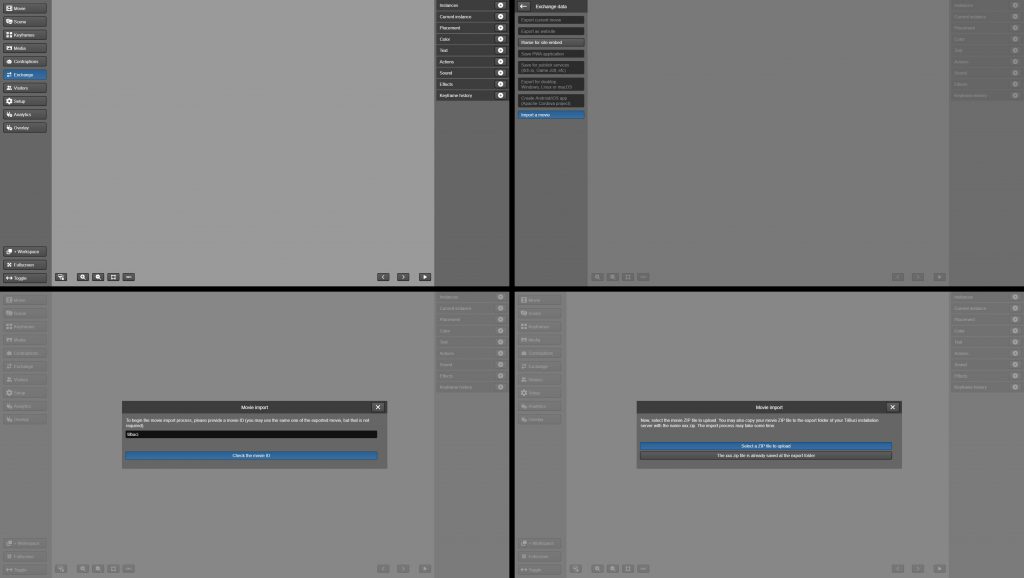
To import the project into your TilBuci installation, when you open the software, go to the “Exchange” menu on the left and click “Import a movie”. Enter the movie ID, as the name of the downloaded file, and click “Check the movie ID”. After that, simply click “Select a ZIP file to upload”, select the file and wait for the import process.